 |
HulaLoop
Simple cross-platform audio loopback and recording.
|
|
HulaLoop
Simple cross-platform audio loopback and recording.
|

Team 30 : Aneesh Gokhale, Emanuel Pituch, Jack McKernan, Neel Patel
There are many technologies for capturing and routing system-wide audio. These technologies vary widely by operating system and can be difficult for developers to interact with and for users to understand. While there are existing technologies that provide a loopback interface for capturing this audio, their features are limited, and none are completely cross-platform. Many of them work well in their respective environments; we hold, however, that a user should have the freedom to move between environments at will without the setback of learning a new tool. Moreover, some of these tools only provide a command line interface. For users unfamiliar with the command line, this can be a severe limitation.
Our audience includes any computer user who wants to record their system-wide audio or any developer who wants to create software that works with that same audio. Our application should cater to the full spectrum of these users: fully-featured enough to meet the needs of experts but still simple enough for novices. By delivering a library for developers and an easy-to-use UI for average consumers, we hope to create the best of both worlds.
As a user,
As a third-party developer,
As a user,
As a developer,
As a user,
As a user,
As a developer,
As a third-party developer,
As a developer,
As a user,
As a user,
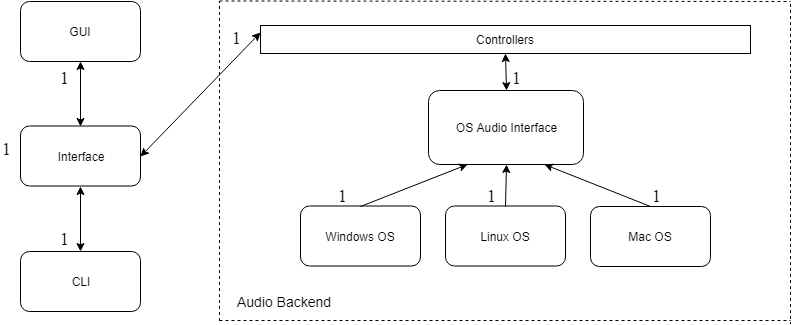
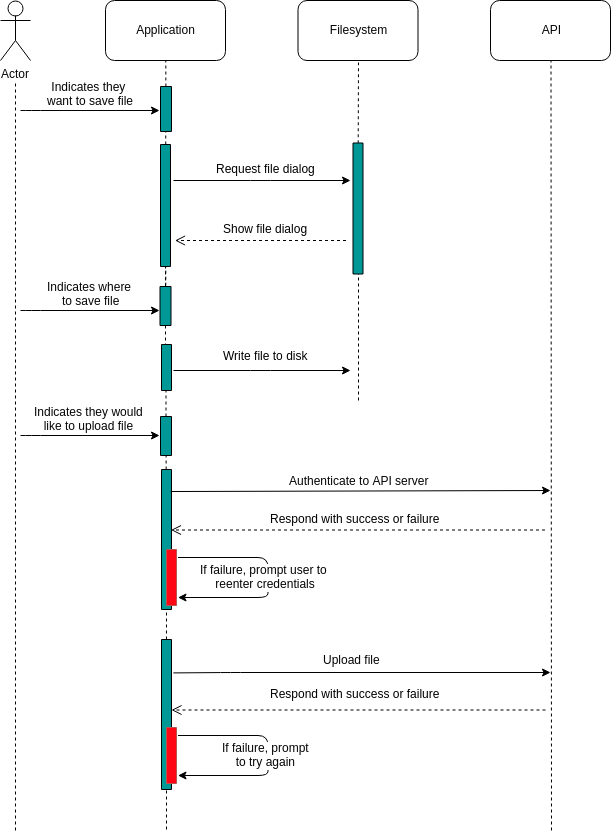
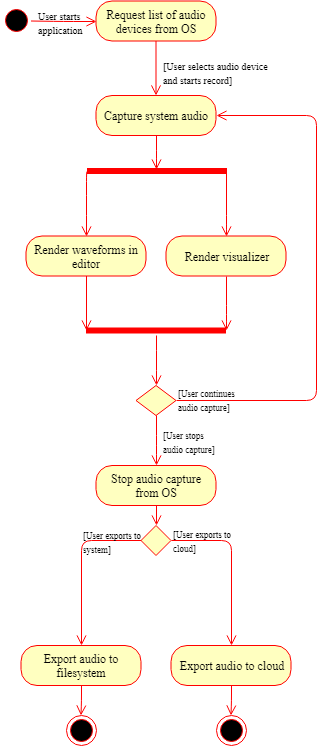
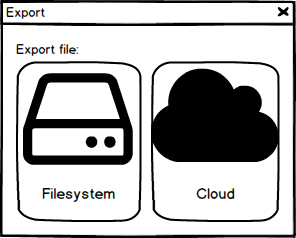
This project is an application that allows users to capture system-wide audio and export the captured data to their filesystem or cloud storage account. Our project follows a layered architecture. The user interface and backend provide different levels of abstraction with higher levels reaching down into lower levels. Each layer in the architecture forms a submodule around the functionality required to capture system-wide audio. The audio backend will access OS-level components to intercept system audio and transfer it to an OS independent interface. This layered architecture connects the UI to the backend in the same manner that a third-party developer would, ensuring the reusability of our library.
The user interface and backend Controller form a one-to-one relationship, providing a nexus point for the distribution of audio within the application. When the audio backend receives data from the OS, it triggers a callback that runs an interface specific operation. The Windows OS, Linux OS, and Mac OS modules represent the OS dependent APIs, which relay their data to the Controller. The Controller acts a factory for the OS specific modules and facilitates the relay of information back to the interface or third-party. This layered architecture allows other applications to access the audio backend without the complication of constructing OS specific objects.
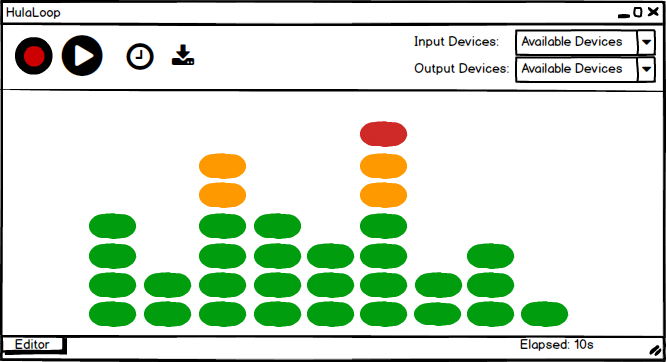
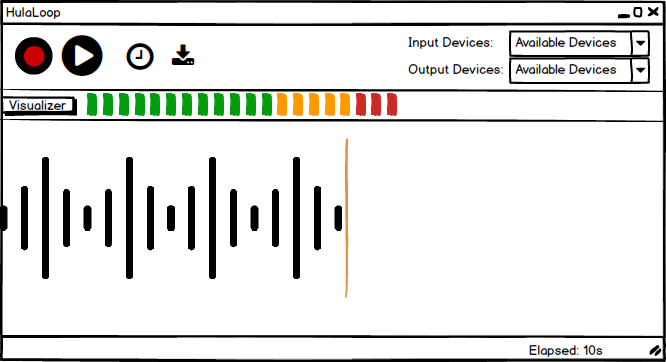
Should the user see the visualizer and the editor at the same time?
``` Option 1: Yes, both should be put on the home screen Option 2: No, there should be a slider toggling the visualizer and editor ``` Decision: We chose to individually display the editor and the visualizer. Putting both on the home screen would show too much information to the user at the same time, going against our simple and intuitive design philosophy. Creating a swappable interface, where only one can be displayed, gives our user an interface that looks cleaner and is more intuitive to use.
How should the user interact with the application when CLI is executed?
``` Option 1: Non-interactive CLI Option 2: Interactive CLI ``` Decision: We plan to incorporate an interactive CLI where the user can command actions to the application which will respond in real-time. This method will increase functionality of the application when running in CLI mode and provide the user with greater control over the application. The interactive mode will help to ensure that the CLI provides the same functionality and usability as its GUI counterpart.
Should the visualizer be displayed at all times?
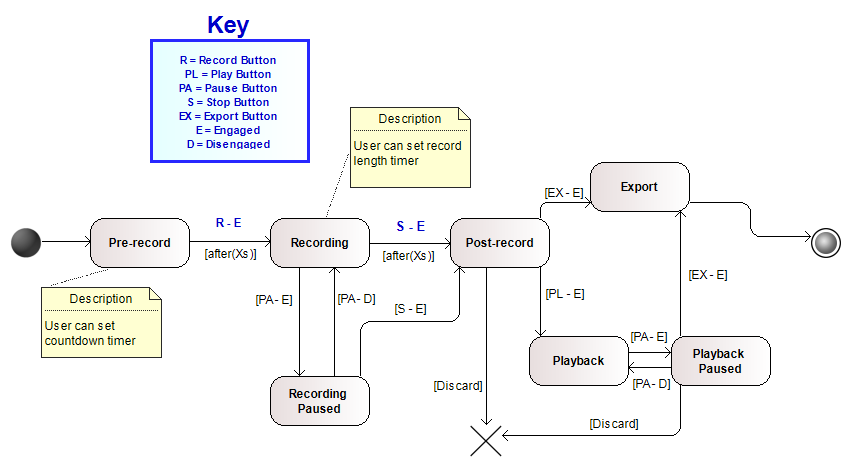
``` Option 1: No, it should only be shown during recording Option 2: Yes, it should always be shown regardless of recording state ``` Decision: We chose to only display the visualizer while recording. One issue with constant visualization is that it requires the consistent presence of an input device. This reliance could make our application more prone to device errors or dropouts. It could also be confusing. Showing the visualization during only the recording state is a clear signal to the user that recording has successfully started.
Which language should our frontend be written in?
``` Option 1: C# WPF Option 2: Qt Quick QML Option 3: GTK+ ``` Decision: We plan to use Qt Quick QML for our frontend. Although C# WPF can be cross-platform compiled, it is not feasible to bridge our C++ code (especially backend audio libraries) to C#. Though GTK+ is C++ based and cross-platform, its widget-based design is very heavy and does not provide the functionality we require to create a clean, customized look. Qt Quick offers intuitive styling and layouts, which enables us to quickly prototype and adapt as we iteratively reach a final design.
Which language should our backend be written in?
``` Option 1: C# Option 2: C++ ``` Decision: Though C# has the ability to compile cross-platform, the implementation is non-standard and third-party. Furthermore, the libraries that our application requires are written in C++, and the Qt framework that we will be using does not support C#. All in all, C++ provides a wider range of support and works well with the speed-oriented, low-level programming that we plan to do.
How do we maintain a reliable application with a low MTTR even after a crash?
``` Option 1: Provide descriptive error messages/codes on failure Option 2: Generate and upload crash reports automatically ``` Decision: We plan to use descriptive error messages/codes. Since we are developing this application under a time constraint, automatically generating and uploading crash reports would add an additional level of complexity. Additionally, users who have no Internet access would never be able to upload logs. This led us to choose descriptive error messages which the user can search or contact us about.
What service should we use to host our compiled binaries?
``` Option 1: AWS Option 2: DropBox Option 3: Github Releases ``` Decision: We plan to use Github Releases to host our compiled binaries. Although AWS offers mass storage, this option is more expensive than the others. Dropbox has free storage and a simple HTTP API, however, their services limit bandwidth to 20 GB per month. Github Releases offers a solution with unlimited bandwidth, a simple API, and large binary storage. It also provides the extra capability of tying our application releases to a specific Git commit.
How do we compile our application on multiple platforms?
``` Option 1: CMake Option 2: QMake with Qt Project file Option 3: SCons ``` Decision: We plan to use CMake to simplify our cross-platform compilation. SCons is relatively new and not as widely supported as the other two options; we fear that this might lead to its eventual discontinuation or lack of maintenance. We discluded QMake because of its strong ties to the Qt Framework, which may be incompatible with other developer’s projects. Therefore, CMake is the perfect choice as it is open source, has a large community, and has a fantastic reputation.
Which audio formats should we support?
``` Option 1: Only MP3 Option 2: MP3 and WAV Option 3: MP3, WAV, and FLAC ``` Decision: We chose to support MP3 and WAV audio file formats. Due to its lossy nature, supporting only MP3 would not appeal to users who need high-quality, uncompressed audio. We chose to support MP3 for those who require extended duration of lower-quality audio or need to save disk space. Though there are many other compressible formats available, MP3 is very well known and has cross-platform support. We chose to support WAV because it is a popular standard for uncompressed audio. The best of both worlds, lossless and compressed audio, is available with FLAC encoding. FLAC, however, is a niche audio format, and we thus chose not to support it for the time being.
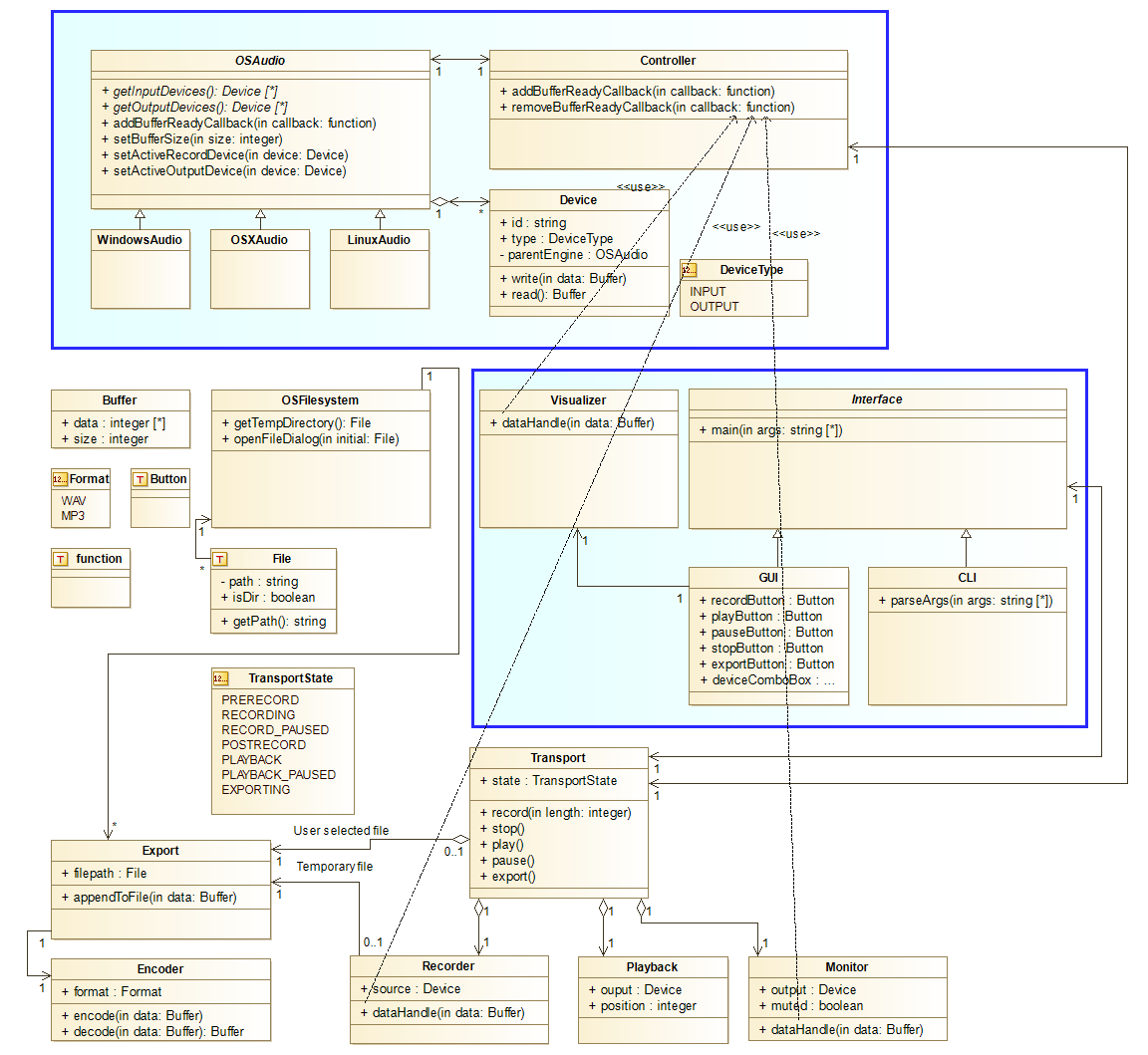
The application is broken up into a set of submodules and further refined to individual classes. The blue squares on the class diagram represent two of the distinct submodules (Audio and UI respectively). The other two are Filesystem and Transport, which are composed of some classes present on the class diagram but also others omitted as a result of the system domain model.
 1.8.11

